
For Canadian and Mexican professionals with a U.S. job offer
Prepare your TN support letter and document guide
Turn your job and credential details into an editable Word letter for your employer to review, plus a personalised PDF preparation guide.
Preview an excerpt of your letter and your packet summary free. $99 USD once unlocks the complete Word letter and personalised PDF guide.
Border or airport preclearance
U.S. consulate in Mexico · Builder and documents in English · Guías en español
Document preparation, not legal advice or an approval guarantee. Check whether TNPath fits your situation.
Your $99 USD packet
Two files, personalised from your answers.
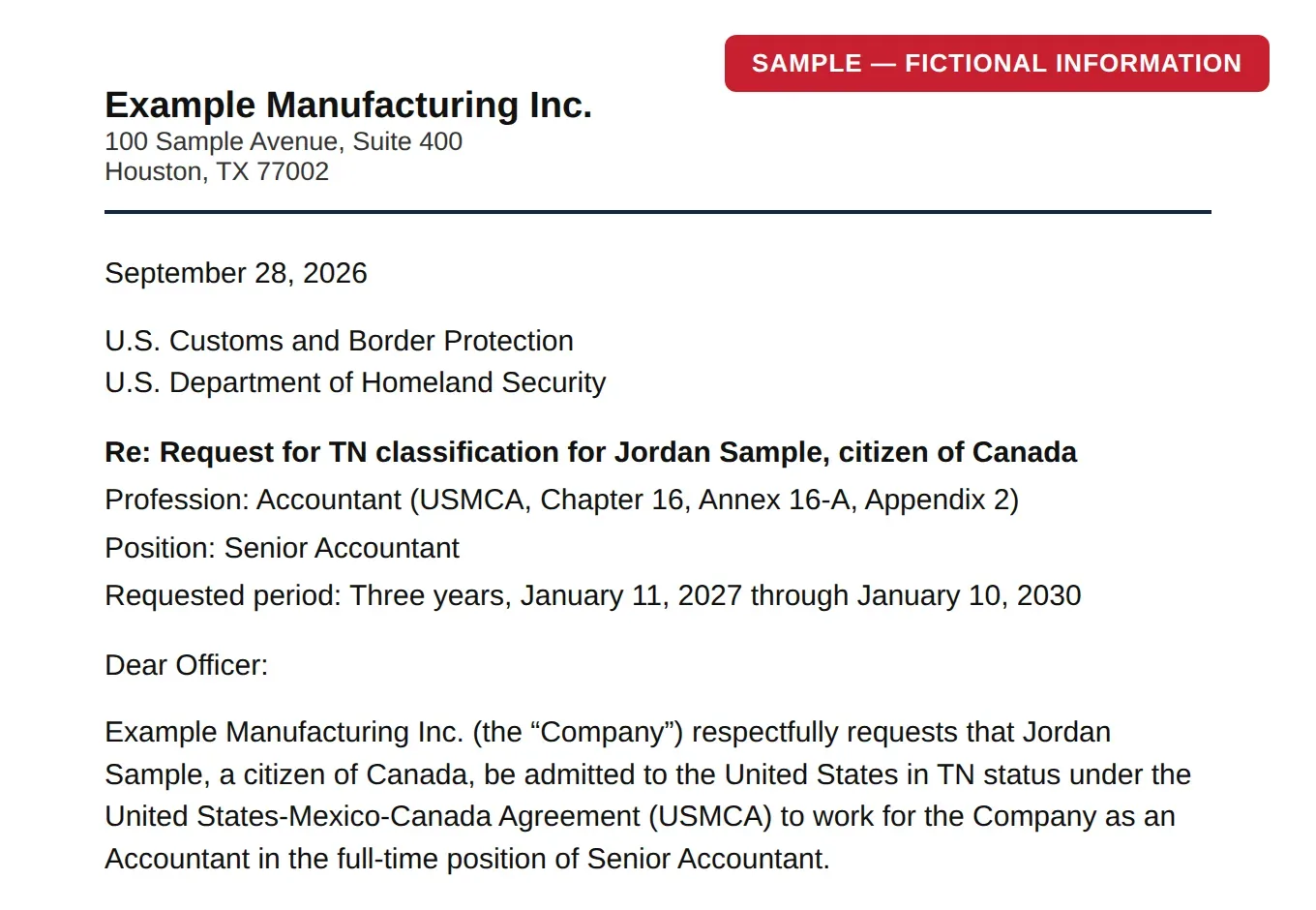
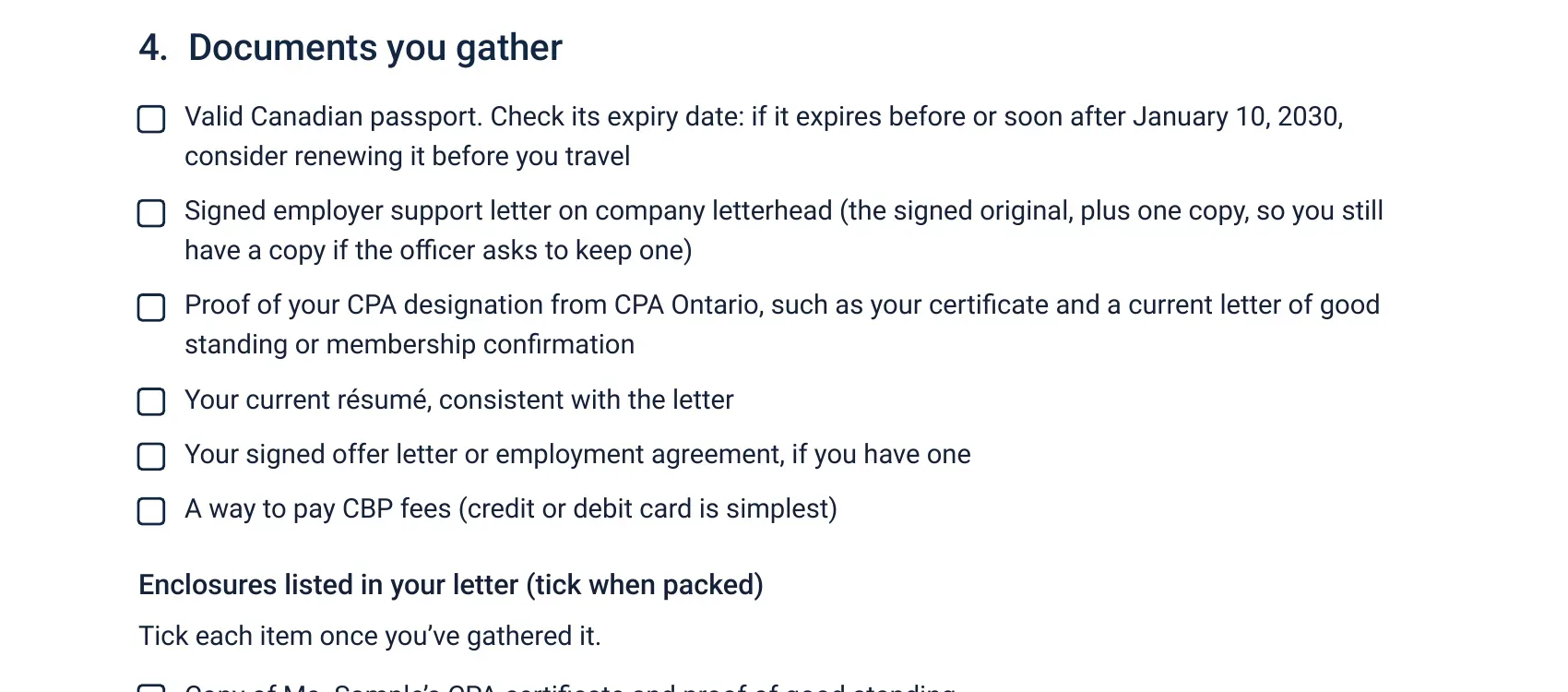
See what you’ll receive
A real packet, built for a fictional applicant.
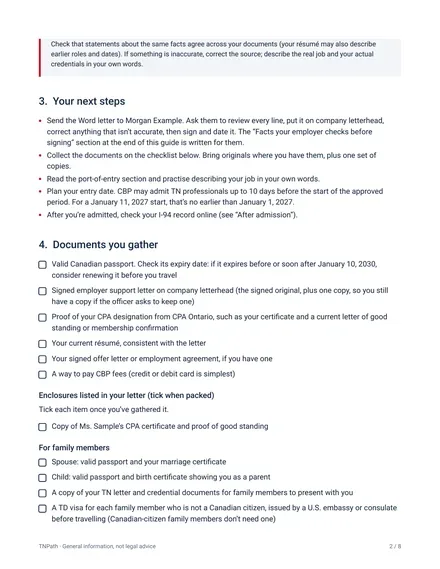
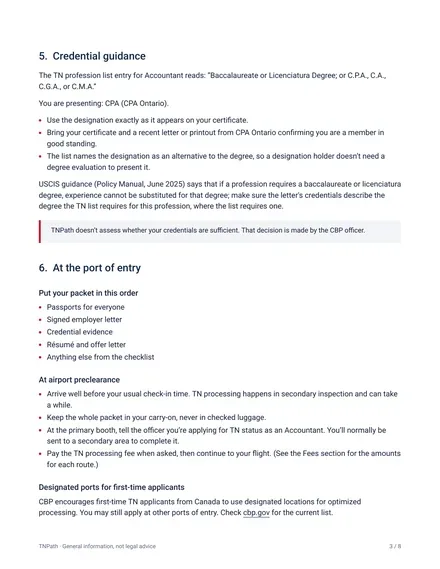
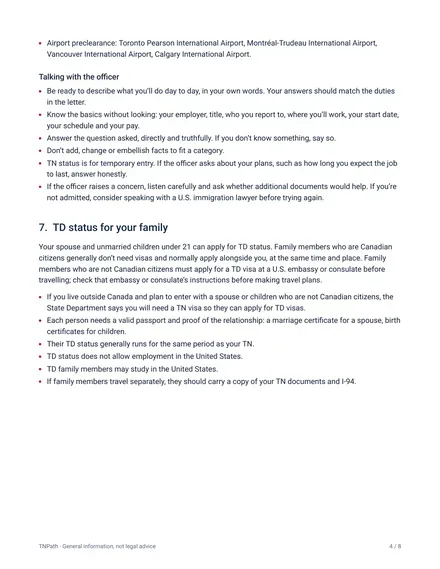
This is what TNPath produced for an invented Canadian CPA joining an invented U.S. company. Your letter and guide are built from your own answers.
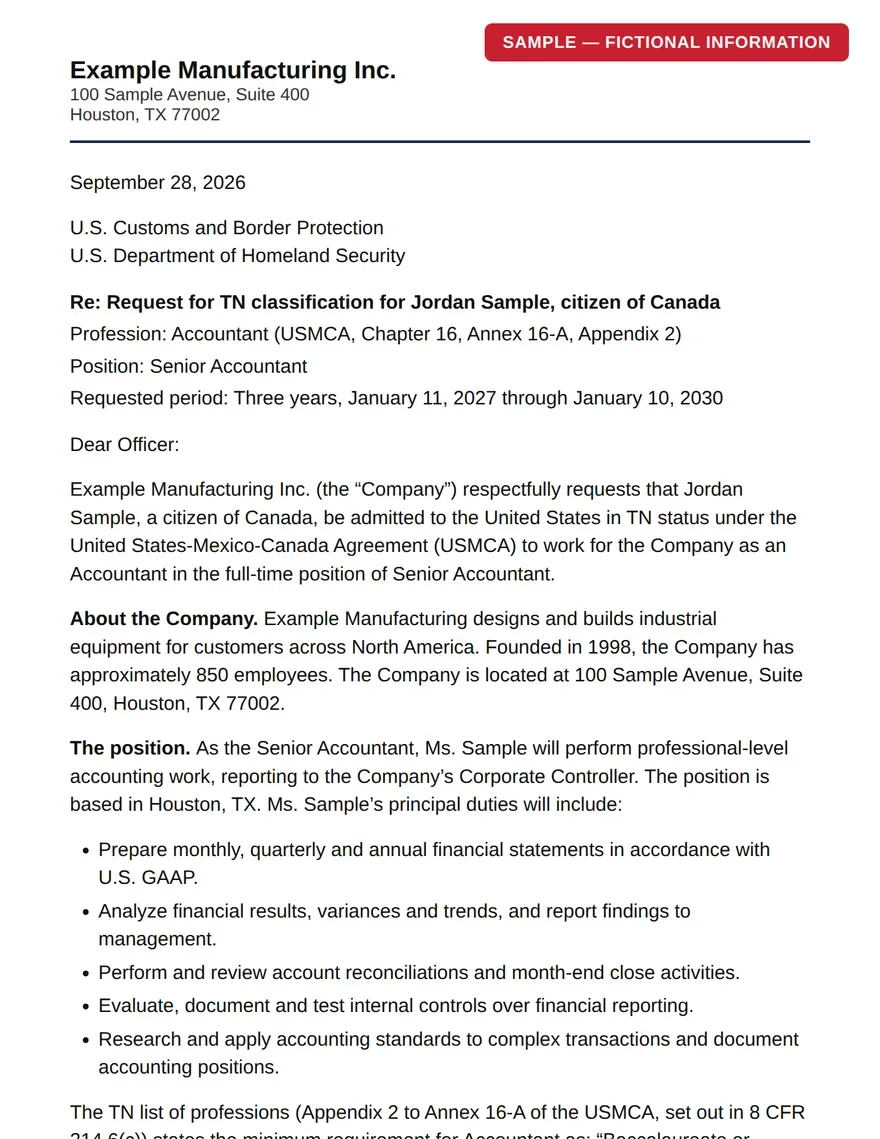
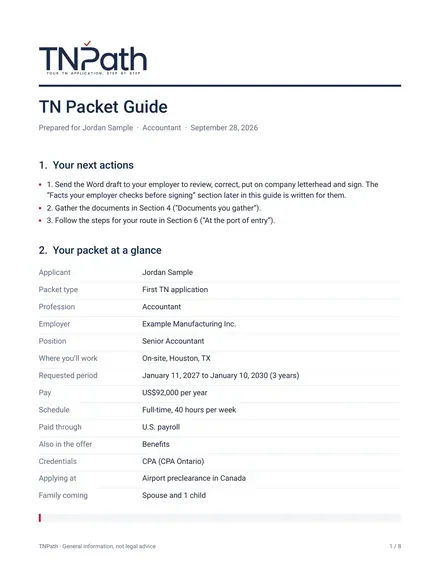
Simple pricing
One packet. One payment.
Preview your letter excerpt and packet summary free. $99 USD once unlocks your Word letter and PDF guide. Same price for every profession. No subscription.
What you receive
- Editable Word letter. Your complete draft, ready for your employer to verify, edit and sign.
- Personalised PDF guide. Your document checklist, credential notes and preparation for your route — the port of entry or the consular interview — based on your answers.
- Email backup. After you generate your files, we also try to email them to your checkout address. Check the delivery status and keep your downloads.
What’s personalised
One guided questionnaire produces a coordinated packet from your answers: your profession’s TN list entry and credential guidance, your duties and pay (salary or hourly, full- or part-time, on-site, hybrid or remote), your dates, a document checklist for your profession and situation, preparation for your route, TD family information when relevant, and a renewal timeline. Wording and job titles that need a second look are flagged for you to check with your employer, not forced into a category. AI writing checks run when available; they never assess eligibility.
What you and your employer still do
You verify your facts and gather the documents on your checklist. Your employer reviews the draft letter, corrects anything that isn’t accurate, puts the final version on company letterhead and signs it. Government fees, credential evaluations and legal advice are not included.
Secure checkout by Stripe. Pay when you want the full files.
Technical problem? Contact hello@tnpath.com within 14 days of purchase if you cannot generate or download your files. We’ll help resolve the technical problem under our technical support policy.
Weighing your options? See how TNPath compares with a lawyer, template kits and free guides.
How it works
From guided questions to a letter your employer signs.
- Build & previewAnswer guided questions. Preview the opening of your letter and your packet summary free.
- Unlock & generatePay $99 once through Stripe, return to this browser, then choose “Generate my packet”. Download both files and receive an emailed backup.
- Employer review & prepareDownload the Word letter. Your employer verifies the facts, puts it on letterhead if appropriate, makes corrections and signs it. Use your personalized PDF guide to assemble supporting documents and prepare for your route: the port of entry or the consular interview.
Wondering whether you need any help at all? Read can I DIY my TN visa application? The 5 paths compared.
The files are a draft letter and a guide, not a finished application. Your employer reviews and signs the letter, and the government decides your application: a consular officer first on the Mexican visa route, and a U.S. Customs and Border Protection officer at the port of entry.
All 63 TN professions
What TN visa profession are you applying under?
Each profession’s questions follow its entry on the TN list: the credential it names, questions about your actual duties and credentials, and the job titles that draw questions.
Is TNPath for my situation?
Built for straightforward cases.
TNPath is a guided document-preparation tool. It doesn’t decide whether you qualify, and some situations are better handled with a lawyer.
TNPath is designed for:
- Canadian citizens applying at a U.S. land border or Canadian airport preclearance
- Mexican citizens applying for a TN visa at a U.S. embassy or consulate in Mexico
- A U.S. job offer already in hand
- A TN visa profession supported by the builder
- Applicants who want a guided DIY document-preparation tool
Consider independent legal advice instead if:
- You’ve had a prior refusal, removal or other immigration issue
- It’s unclear which TN visa category your job fits
- Your credentials don’t clearly match the category’s requirement
- You own part of the U.S. company, or you’d be self-employed
- You need a USCIS filing from inside the U.S.
- You want case-specific strategy
Private by design
Your answers stay on your device while you build.
The builder runs in your browser. There’s no account to create, and we don’t keep copies of your packet.
Answers stay in your browser
While you build, your answers are saved in your browser, not on our servers, and you can erase them at any time. AI checks send your letter text through our server to Anthropic: the optional free proofread before purchase, the AI proofreading you can choose when you generate after purchase, and the optional full writing review (which also sends an answer summary). TNPath doesn’t retain that content. Read the AI data-handling details.
Payment handled by Stripe
Checkout runs on Stripe’s secure page. TNPath never sees your card details.
An emailed backup you can keep
After you generate your packet, your files pass through our server to our email provider, Resend. TNPath discards them after sending; Resend may retain the message and attachments under its policy. Keep your email and downloaded files. Privacy details.
About TNPath
About TNPath.
Built by a Canadian who has been through the TN process. TNPath is a DIY document-preparation tool, not a law firm.
Technical support covers problems with the tool itself — generating, downloading or regaining access to your files — by email at hello@tnpath.com.
Resources
Guides, tools and updates
Plain-English guides for Canadians. See all guides. New: TN visa taxes for Canadians.
Free guides
Start hereTN visa support letter: what to include, section by section
The employer letter is the centre of your application. See every section it needs, the five points the regulation asks for, and the mistakes to avoid. No official form exists, so treat it as a starting point.
Read the outline →TNPath, a lawyer or a template kit?
Cost, what you get, and when a lawyer is the better choice.
Read →GuideTN visa document checklist
Everything to bring, by profession, in one printable list.
Read →GuideApplying at the border
Step by step at a land crossing or airport preclearance.
Read →ReferenceAll 63 TN professions
The full USMCA list with each profession’s requirements.
Read →New guideWhat a TN visa costs in 2026
The $50 CBP fee, the land-border I-94 fee, and how other routes compare.
Read →For your employerA guide for HR and hiring managers
What TNPath produced, and what the employer checks, edits and signs.
Read →Free tools
Four short tools that run in your browser. Nothing you enter is stored or sent to TNPath.
TN visa renewal date calculator
Enter the Admit Until date from your I-94 record and see when to start preparing and when to do a final check.
Open →ToolTN visa cost calculator
Work out the government fees for applying at a land port of entry or airport preclearance, including family members in TD status.
Open →ToolTN document checklist generator
Answer four questions about your profession, credential route, application type and family, and get a document checklist organized for your situation.
Open →ToolTN support letter checker
Paste an employer support letter and check whether it mentions the five items the TN regulation lists: profession, duties, length of stay, credentials and pay.
Open →Latest updates
USMCA 2026 review: what it actually means for TN status
The July 2026 review changed nothing for the TN visa. What it settles, and what is still speculation.
Read →October 2, 2026Social-media screening expands to TN and TD visa applicants
What changed on October 1, 2026, who it covers, and why most Canadians applying at the border aren’t affected.
Read →Common questions
Know what TNPath is, and what it isn’t.
Does TNPath tell me whether I qualify for TN status?
No. TNPath is a document-assembly tool. It organizes the facts you provide into templates and gives general information. It does not make eligibility determinations or recommend case-specific legal strategy. Only the U.S. government decides: U.S. Customs and Border Protection at the border or preclearance, and for Mexican citizens a consular officer decides the visa first.
Who is TNPath for?
Canadian citizens applying for TN status at a U.S. port of entry or airport preclearance, and Mexican citizens applying through the consular route, with a U.S. job offer in hand. TNPath covers all 63 professions on the TN list, from Accountant and Engineer to Agriculturist, Geophysicist and Zoologist. It isn’t built for applications filed from inside the U.S. through USCIS. See Is TNPath for my situation?
Can I see a sample before I pay?
Yes. The sample packet shows a complete employer letter and packet guide built for a fictional applicant. You can also build and preview your own letter free before you decide to pay.
What exactly do I get after paying?
After Stripe confirms your payment, return to the same browser and choose “Generate my packet”. You can then download your employer support letter as an editable Word document and your personalized packet guide as a PDF (checklist, credential guidance, port-of-entry or consular interview prep, family information and renewal timeline). Before you generate, you choose whether the packet is made with AI proofreading or without it; if you choose proofreading, you can review and undo the corrections it applies. After you generate your files, we also try to email them to your checkout address. Check the delivery status in the builder and keep your downloads.
What does my $99 cover?
One TN packet for the application you build here: an editable employer support letter (Word) and a personalized packet guide (PDF), generated from your answers. You can correct your answers and regenerate your packet — choose “Regenerate updated files” — and download your files again at no extra cost. Government fees, credential evaluations and legal advice are not included.
Can my employer edit the Word letter?
Yes. The letter downloads as an editable Word document. Your employer can change any wording in it, put the final version on company letterhead and sign it. Your employer doesn’t need TNPath access or an account to edit it.
How does access to my packet work?
There is no account or password. After Stripe confirms your payment, your packet unlocks in this browser, and later visits in the same browser re-check your purchase and unlock again. When you generate, we try to email both files to the address you used at checkout — up to 3 email sends per purchase. Check the delivery status in the builder, and keep your downloads as your backup. If you lose access in this browser, email hello@tnpath.com with your Stripe receipt and we’ll send a one-time unlock link: it works once, an unused link expires after 14 days, and opening it restores access so you can rebuild and download without paying again for this purchase.
What does my employer need to do?
Review the draft letter, correct anything that isn’t accurate, put the final version on company letterhead and have an appropriate company representative sign it. Our guide for employers explains this in plain language, and after payment TNPath gives you a short email you can copy and send with the letter.
Is my information stored anywhere?
Your answers stay in your own browser while you build, so you can pick up where you left off. If you use the optional free proofread before paying, the text of your draft letter and its field index are sent through our server to our AI provider, Anthropic, to check the wording and locate each finding. After you pay, you can choose to generate with AI proofreading; only then is your letter text sent for that check. An optional full writing review sends the letter, its field index and an answer summary. Applying or undoing a suggested fix stays in your browser and does not request another review. Anthropic processes AI requests under its own retention policy. Your finished files pass through our server to Resend for email delivery; Resend may retain messages and attachments under its policy. TNPath discards the files after sending. We don’t keep copies of your answers, letter or files. We count anonymous events, such as how many people reach the preview, but never your answers. Stripe processes your payment and receives only what you enter on its checkout page. See our privacy policy.
What if I lose my files?
If you generated your files, check your inbox for the backup email. If you paid but didn’t generate them yet, or you’ve lost that email and your browser data too, write to hello@tnpath.com with your Stripe receipt. Once we confirm your purchase, we’ll send you a one-time unlock link (valid 14 days, single use) so you can restore access, rebuild and download your packet without paying again. You never need to pay twice. If your answers are no longer saved in your browser, you’ll enter them again, which takes about 10 minutes. The 14 days here is about the unused link itself; it is separate from the 14-day window in §5 of the Terms for emailing about a technical problem.
What if my role has direct reports, or my job title is borderline?
The builder flags it for independent review. That includes direct reports, clerical or programming wording, and job titles that USCIS guidance treats as a different occupation. TNPath won’t force a role into a standard packet, provide case-specific strategy, or suggest how to describe facts differently.
Does using TNPath create an attorney-client relationship?
No. TNPath is not a law firm, is not run by lawyers, and does not provide legal advice. If your situation is complex, consider speaking with a U.S. immigration lawyer.
Why pay if the guides are free?
The guides explain the process. The paid builder organizes your own facts into an editable employer letter and a personalized packet guide. You can read every guide and inspect the complete fictional sample without paying. Payment buys document preparation, not legal advice or a better chance of approval.
Can I pause and come back later?
Yes, in the same browser on the same device. Your answers save as you go. Private browsing, clearing site data or switching devices can remove or leave behind that progress. No account syncs your answers. After purchase and generation, keep your emailed files and downloads as your backup.
How is AI used?
You can generate with or without AI proofreading. If you choose proofreading, your letter text is sent to Anthropic for that check, and you can review and undo applied corrections. Generating without proofreading sends no text to the AI service. AI never decides eligibility.
More answers on the dedicated pages: TN visa for Canadians, changing jobs on a TN visa, the TN renewal date calculator, the 2026 USMCA review and TNPath, lawyers and template kits compared.
Build your TN visa packet in one sitting.
Plain-English questions. Free preview. $99 USD to unlock your Word letter and PDF guide.
Start my Canadian preview Start my Mexican preview